
You sent the deck. You sent the follow-up. You still have no idea if they opened it. Most presentation tools were designed for the moment of delivery – the live meeting, the screen share, the pitch. What happens after you hit send is usually a black box.
That’s changed in 2026. A handful of tools now tell you exactly when someone opens your file, which slides they spent time on, and whether they came back for a second look. That data isn’t a nice-to-have anymore – it’s the difference between following up at the right moment and chasing a prospect who lost interest three days ago.
This post compares eight presentation tools on their viewer analytics and tracking capabilities, so you can choose the one that actually fits how you sell.
Key Insights
- Most presentation tools were built for creation, not post-send intelligence – only a subset track who views your content and how they engage.
- Viewer analytics – open alerts, time-on-slide, repeat visits – are now available in tools like Highnote.io, Pitch, Gamma, Beautiful.ai, and DocSend.
- Highnote’s Share and Track feature delivers slide-level engagement data, real-time open notifications, and AI-powered content optimization in one platform built specifically for sales professionals.
- PowerPoint and Google Slides still have no native viewer tracking – you get zero signal after sharing a link or attachment.
- The best follow-up timing is when a prospect is actively viewing your deck – tools with real-time alerts make that possible; tools without them make it guesswork.
- Freemium options exist: Highnote, Gamma, and Pitch all offer free tiers that include some form of tracking.
Why Viewer Tracking Matters More Than Slide Design
Most sales conversations don’t end with a handshake in the room. They end when someone walks back to their desk, opens your deck, and starts comparing you to the competition. You’re not there for that moment – but your analytics can be.
Consider two scenarios. In the first, you send a PDF, and a week later you send a generic follow-up email. In the second, you send a trackable link and get a notification three minutes after the prospect opens it. You know they spent four minutes on your pricing section and came back the next morning. You call them while they’re still thinking about it.
The second scenario isn’t theoretical – it’s what teams using viewer tracking tools like Highnote are doing every day. The data changes the timing and specificity of every follow-up.
According to Gartner, over 80% of enterprise teams now use AI-assisted content creation in some capacity – and analytics-driven presentation tools are one of the fastest-moving areas of that shift.
The 8 Presentation Tools Compared on Analytics and Tracking
Here’s a side-by-side look at how each tool handles viewer analytics, open alerts, AI content features, and pricing.
Tool | Viewer Analytics | Open Alerts | AI Content | Pricing | Best For |
Highnote.io | Yes – slide-level | Real-time alerts | Yes – AI-powered | Freemium | Sales pros |
Pitch | Yes – slide-level | On open + revisit | Yes | Free / $8+/mo | Sales teams |
Gamma | Yes – section-level | On open | Limited | Free / $10+/mo | Startups / founders |
Beautiful.ai | Yes – slide-level | On open | No | $12+/mo | Design-focused teams |
DocSend | Yes – page-level | Real-time | No | $15+/mo | Fundraising / enterprise |
PowerPoint | No native tracking | None | Yes (Copilot, paid) | $6+/mo | Enterprise (general) |
Google Slides | No native tracking | None | Limited (Gemini) | Free / Workspace | Teams / collaborators |
Canva | Limited | None | Yes (Magic Studio) | Free / $13+/mo | Non-designers |
Let’s break down what each tool actually offers – and where they fall short.
1. Highnote - Built for Sales Tracking From the Ground Up
Highnote is the tool in this comparison most explicitly built around the post-send moment. Upload a PDF, sales deck, or pitch – it’s instantly converted into a trackable smart link. No redesign required. Recipients click the link and view immediately, with no login friction on their end.
The Share and Track feature captures engagement analytics at the slide level: when the file was opened, how long each section was viewed, which pages captured the most attention, and whether the prospect came back. Real-time notifications fire the moment someone engages – so you know exactly when interest is high.
Beyond tracking, Highnote layers AI on top. It generates presentations, rewrites and personalizes content, and provides optimization suggestions – all within the same platform. You don’t need a separate tool to create the deck and another to track it.
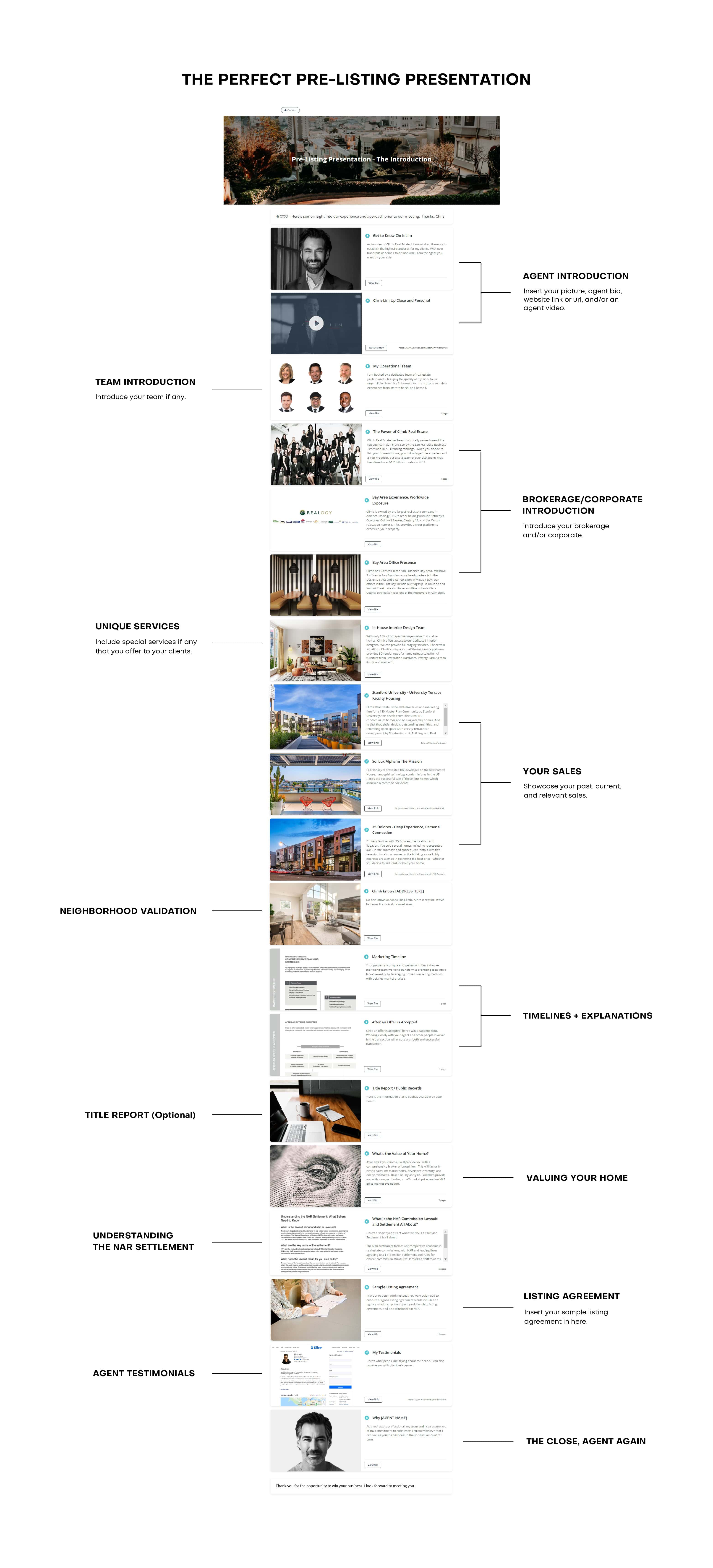
Highnote works across use cases: listing and buyer presentations for real estate agents, pitch decks for sales teams, proposals for consultants, insurance presentations, and more. Brands like Coldwell Banker, Keller Williams, Douglas Elliman, and RE/MAX are among its users.
- Analytics depth: Slide-level engagement, time spent per section, repeat visits
- Alerts: Real-time open notifications
- AI features: Presentation generation, content rewriting, personalization, summaries
- Sharing modes: Single File Mode (speed) and Multi File Mode (full experience with multiple docs, videos, links)
- Pricing: Free plan available – no credit card required
You can use Highnote for free: upload a file, generate a tracking link, and know the moment it’s opened.
2. Pitch - Strong Analytics, Strong Collaboration
Pitch was designed for sales and agency teams that share decks digitally. Its viewer analytics are slide-level and detailed: you can see when someone opened your deck, how long they spent on each slide, and where they dropped off. Analysts have compared its tracking depth to dedicated sales enablement tools.
Real-time collaboration is the other headline feature – Pitch matches Google Slides for co-editing, with async commenting and task assignment layered on top. The template library is professionally designed and broad.
The limitations: analytics only work when sharing through Pitch’s own platform. Export to .pptx loses interactive features. Business pricing escalates quickly at $80/month for teams.
- Analytics depth: Slide-level – opens, time per slide, drop-off point
- Alerts: On open and revisit
- Pricing: Free; Pro $8/user/month; Business $80/month
3. Gamma - Fast AI Creation, Basic Tracking
Gamma is the fastest prompt-to-deck tool in this comparison – full deck in under 90 seconds from a text prompt. It’s web-native, which means presentations live at a URL rather than as a file, and that makes sharing analytics possible.
Gamma tracks who viewed your deck and how long they spent – useful for sales and proposals shared asynchronously. But the analytics are section-level rather than slide-level, and the format doesn’t feel like a traditional deck to recipients expecting a .pptx.
- Analytics depth: View counts, time on deck – less granular than Highnote or Pitch
- Alerts: On open
- Pricing: Free (with Gamma branding); Plus $10/month; Pro $20/month
4. Beautiful.ai - Design-First, Analytics Included
Beautiful.ai’s Smart Slides automatically align and resize content as you type – it’s the strongest design-automation tool in this list for producing visually consistent decks without design skills.
Salesforce integration with per-slide engagement analytics is a differentiator for CRM-connected sales teams. Tracking works when sharing through the platform – you get open notifications and basic engagement data. What it lacks is the depth and real-time intent signals of tools like Highnote or Pitch.
- Analytics depth: Slide-level, Salesforce-integrated
- Alerts: On open
- Pricing: No free plan; Pro $12/month; Team $40/user/month
5. DocSend - Enterprise-Grade Document Tracking
DocSend (now part of Dropbox) is the most established dedicated document tracking tool in this list. It operates at the page level: every page view, time spent, and viewer identity is captured. It’s widely used for investor decks and due diligence packages in fundraising contexts.
Access controls, password protection, link expiration, and custom branding are strengths. The limitation is the price: $15–$65/user/month, with no free plan. It’s a dedicated tracking tool, not a presentation creation tool – you’ll still need something else to build the deck.
- Analytics depth: Page-level – detailed, enterprise-grade
- Alerts: Real-time
- Pricing: Basic $15/user/month; Advanced $65/user/month; no free plan
6. Microsoft PowerPoint - The Enterprise Standard, Zero Native Tracking
PowerPoint remains the presentation standard in enterprise – and when you send a .pptx as an email attachment, you get absolutely no signal about what happens next. No opens, no views, no engagement data. Nothing.
Copilot AI (available as a $30/user/month add-on via Microsoft 365) adds content generation and design suggestions, but tracking is not part of the offering. If you’re using SharePoint links to share presentations internally, SharePoint provides some basic view counts – but nothing resembling sales intent data.
- Analytics depth: None for shared files; SharePoint view counts for internal links only
- Alerts: None
- Pricing: Included in Microsoft 365 ($6+/user/month); Copilot AI +$30/user/month
7. Google Slides - Best Free Collaboration, No Tracking
Google Slides is the best free option for real-time collaboration – and like PowerPoint, it offers zero native viewer tracking for shared links. You can see who has access to a file and when it was last opened inside your own Google Drive, but you cannot track external viewers.
Gemini AI features require a paid Google Workspace plan. If tracking prospect engagement is a priority, Google Slides requires a third-party tool on top.
- Analytics depth: None for external sharing
- Alerts: None
- Pricing: Free; Workspace plans from $12/user/month for Gemini AI
8. Canva - Great Design, Limited Post-Send Intelligence
Canva’s strength is breadth: 250,000+ templates, AI image generation (Magic Studio), and an interface that non-designers can use immediately. It handles presentations alongside social, documents, and video – one tool for many content types.
Presentation tracking is limited. Canva shows basic view counts for some link types, but slide-level engagement data and real-time open alerts are not part of the offering. For teams that send sales presentations and want meaningful buyer-intent signals, Canva is better treated as a creation tool paired with a dedicated tracking platform.
- Analytics depth: Basic view counts only
- Alerts: None
- Pricing: Free; Pro $13/month; Teams $10/user/month
What to Look for in a Presentation Tracking Tool
Not all tracking features are equal. Here’s what actually moves the needle for sales teams:
Slide-Level vs. Deck-Level Analytics
Knowing someone opened your deck is useful. Knowing they spent 6 minutes on slide 4 (your pricing page) and skipped slide 7 (the case study) is actionable. Look for tools that report at the slide or page level, not just a single total-time number.
Real-Time Alerts vs. Next-Day Reports
The best time to follow up is when a prospect is actively reviewing your material – not 24 hours later. Real-time open notifications let you call or message at peak interest. Tools that batch analytics into daily digests miss that window.
Repeat Visits and Multi-Viewer Tracking
A prospect who opens your deck once and leaves is different from one who returns three times and shares it with a colleague. Repeat visit tracking and multi-viewer detection reveal buying committee involvement – signals that standard open-rate metrics miss entirely.
Zero Friction for the Viewer
If recipients have to download a file, create an account, or install a plugin to view your content, tracking data drops sharply. The best tools deliver a clean viewing experience via a simple link – no friction, no barriers.
AI That Acts on the Data
The next layer beyond tracking is acting on what you learn. Highnote’s AI features – content rewriting, personalization, and optimization suggestions – let you close the loop: see what resonates, update the deck, and send a sharper version. That combination of analytics plus AI is rare in a single platform.
Highnote vs. Dedicated Document Tracking Tools (DocSend, Papermark)
It’s worth separating two categories here: all-in-one sales presentation platforms (Highnote, Pitch) and standalone document trackers (DocSend, Papermark). They solve different pieces of the same problem.
Highnote collapses the workflow. You can build the deck inside Highnote using AI, upload an existing PDF or PowerPoint, add videos and links to a multi-file experience, and share it – all from one place. The tracking layer is built in, not bolted on. For sales professionals who send multiple types of materials daily and want everything under one link, that matters.
Highnote’s Single File Mode is the fastest way to get tracking live: upload a PDF, generate a smart link, send it, and get notified when it’s opened. No redesign. No setup.
Multi File Mode lets you combine documents, videos, and links into one polished shareable experience – closer to a digital sales room than a traditional deck.
Which Tool Should You Use?
The right choice depends on your primary use case:
- You send presentations daily and need buyer intent signals: Highnote. It’s the only tool in this comparison that combines real-time tracking, slide-level analytics, AI creation, and a freemium entry point without requiring you to buy two separate products.
- Your team collaborates heavily on deck creation: Pitch. Closest to Google Slides for co-editing, with strong tracking layered on.
- You’re in enterprise sales and need CRM-connected tracking: Beautiful.ai with Salesforce, or DIGIDECK for higher-end requirements.
- You’re sharing investor decks and need enterprise-grade access control: DocSend. Purpose-built for secure document sharing with detailed page analytics.
- Design quality matters most and tracking is secondary: Canva for creation; pair with a tracking tool if needed.
The Bottom Line
Presentation tools have split into two categories: tools that help you create, and tools that help you win. The best platforms in 2026 do both – and the ones that include genuine viewer analytics are now table stakes for any team that sends decks as part of a sales or business development motion.
If you’re still attaching PDFs to emails and waiting for a reply, you’re missing half the picture. The prospect who spent 8 minutes on your pricing slide and came back the next morning deserves a call today – not a generic follow-up next week.
Highnote’s Share and Track feature is free, works with your existing files, and delivers the real-time intelligence that turns presentation sharing into pipeline intelligence. Sign up free – no credit card required.
Frequently Asked Questions
Which presentation tools track who views your deck?
Highnote, Pitch, Gamma, Beautiful.ai, and DocSend all offer some form of viewer tracking. Highnote and Pitch provide the most granular slide-level data with real-time open alerts. PowerPoint and Google Slides have no native tracking when sharing files externally.
Can I track a PowerPoint presentation after I send it?
Not natively. Microsoft PowerPoint has no built-in tracking for shared files. To track viewer engagement on a PowerPoint, you need to upload it to a dedicated platform – such as Highnote, DocSend, or Pitch – which converts it into a trackable link. Highnote accepts PDF and PowerPoint uploads and generates a smart sharing link immediately.
What is the best free presentation tool with viewer tracking?
Highnote offers a freemium plan with file tracking and analytics included – no credit card required. Gamma and Pitch also have free tiers with basic tracking. DocSend has no free plan, starting at $15/user/month.
What is slide-level analytics in presentation tools?
Slide-level analytics means the tool reports viewing data per individual slide – how long each slide was viewed, which slides were skipped, and where viewers spent the most time. This is more actionable than deck-level analytics (total time only), because it tells you which content drove interest and which sections lost attention.
Does Highnote work with existing PDFs and PowerPoints?
Yes. Highnote accepts existing PDF and PowerPoint files without requiring a redesign. Upload the file, generate a smart link, and share it. The viewer sees a clean, professional experience – and you receive real-time engagement analytics from the moment they open it.